


JavaScript Array Methods Explained (map, filter, reduce)
map, filter, and reduce are three of the most useful array methods in JavaScript, but beginners often mix them up or reach for the wrong one. This blog explains what each method actually does, walks through simple real-world examples, and shows the common mistakes that trip people up when they're ju
f you've written a for loop just to go through an array and pick out a few items, or build a new list from an old one, you've already done the job that map, filter, and reduce were built for. These three methods do the same kind of work as a loop, but in a cleaner and more readable way.
The tricky part for beginners is not the syntax. It's knowing which one to reach for. This blog explains what each method actually does, in plain and simple words, with real examples you'll recognize from everyday code.
Why do these methods exist?
Before these methods existed, if you wanted to change every item in an array, or pick out only some of them, you had to write a for loop by hand every single time.
js
const numbers = [1, 2, 3, 4, 5];
const doubled = [];

for (let i = 0; i < numbers.length; i++) {
  doubled.push(numbers[i] * 2);
}

console.log(doubled); // [2, 4, 6, 8, 10]
This works fine, but you have to write the same loop structure over and over, every time you do this kind of task. map, filter, and reduce do the exact same kind of work, but they come built into JavaScript, so you don't have to write the loop yourself. They also make your code easier to read, because the method name itself tells you what's happening. Seeing .map() immediately tells you "this creates a new array by changing each item," without you needing to read every line to figure that out.
map - change every item in an array
map goes through every item in an array, does something to it, and puts the result into a brand new array. The original array is never changed.
js
const numbers = [1, 2, 3, 4, 5];

const doubled = numbers.map(function (num) {
  return num * 2;
});

console.log(doubled); // [2, 4, 6, 8, 10]
console.log(numbers); // [1, 2, 3, 4, 5] - unchanged
Here's what's happening, step by step. map takes a function as its input. It runs that function once for every item in the array. Whatever the function returns becomes the new item in the new array, at the same position. So 1 becomes 2, 2 becomes 4, and so on, and all of these new values are collected into doubled.
Use map any time you want a new array that's the same length as the original, just with each item changed in some way.
js
const names = ["riya", "aman", "kabir"];

const capitalized = names.map(function (name) {
  return name.charAt(0).toUpperCase() + name.slice(1);
});

console.log(capitalized); // ["Riya", "Aman", "Kabir"]
filter - pick out only some items
filter also goes through every item in an array, but instead of changing each item, it decides whether to keep it or throw it away. The result is a new array that only has the items that passed the test.
js
const numbers = [1, 2, 3, 4, 5, 6];

const evens = numbers.filter(function (num) {
  return num % 2 === 0;
});

console.log(evens); // [2, 4, 6]
The function you pass to filter should return true or false for each item. If it returns true, the item makes it into the new array. If it returns false, that item gets left out. In this example, num % 2 === 0 checks if a number can be divided by 2 with nothing left over, which is just a simple way to check if a number is even.
filter is what you reach for whenever you want a smaller version of an array, keeping only the items that match some condition.
js
const users = [
  { name: "Riya", age: 17 },
  { name: "Aman", age: 21 },
  { name: "Kabir", age: 19 }
];

const adults = users.filter(function (user) {
  return user.age >= 18;
});

console.log(adults);
// [{ name: "Aman", age: 21 }, { name: "Kabir", age: 19 }]
reduce - combine everything into one value
reduce is the one beginners usually find harder, mostly because it can do more than one job. But the core idea is simple. reduce goes through every item in an array and combines them all into a single result. That result could be a number, a string, an object, or even a new array.
Let's start with the simplest example: adding up a list of numbers.
js
const numbers = [1, 2, 3, 4, 5];

const total = numbers.reduce(function (accumulator, current) {
  return accumulator + current;
}, 0);

console.log(total); // 15
There are two new things here, so let's slow down. reduce takes a function, just like map and filter, but this function takes two inputs instead of one: accumulator and current. Think of accumulator as a running total that carries over from one item to the next. current is just the item currently being looked at.
The second thing is that 0 at the end. That's the starting value for accumulator, before the loop even begins. Here's what happens step by step:
Start:
accumulator = 0Item
1:accumulatorbecomes0 + 1 = 1Item
2:accumulatorbecomes1 + 2 = 3Item
3:accumulatorbecomes3 + 3 = 6Item
4:accumulatorbecomes6 + 4 = 10Item
5:accumulatorbecomes10 + 5 = 15
Whatever the function returns each time becomes the new accumulator for the next item. Once the array is finished, reduce gives you the final accumulator value, which is 15.
reduce isn't just for adding numbers. It can build anything as its final result.
js
const items = ["apple", "banana", "apple", "orange", "banana", "apple"];

const countMap = items.reduce(function (accumulator, item) {
  if (accumulator[item]) {
    accumulator[item]++;
  } else {
    accumulator[item] = 1;
  }
  return accumulator;
}, {});

console.log(countMap); // { apple: 3, banana: 2, orange: 1 }
Here, instead of starting with 0, we start with an empty object {}. Each time through, we check if the item is already a key in our object. If it is, we add 1 to its count. If it's not, we set it to 1. By the end, accumulator holds a count of how many times each fruit appeared.
A simple way to decide if you need reduce is this: if you're trying to turn an array into one single thing, whether that's a total, a count, an object, or anything else, reduce is probably the right tool.
Using map, filter, and reduce together
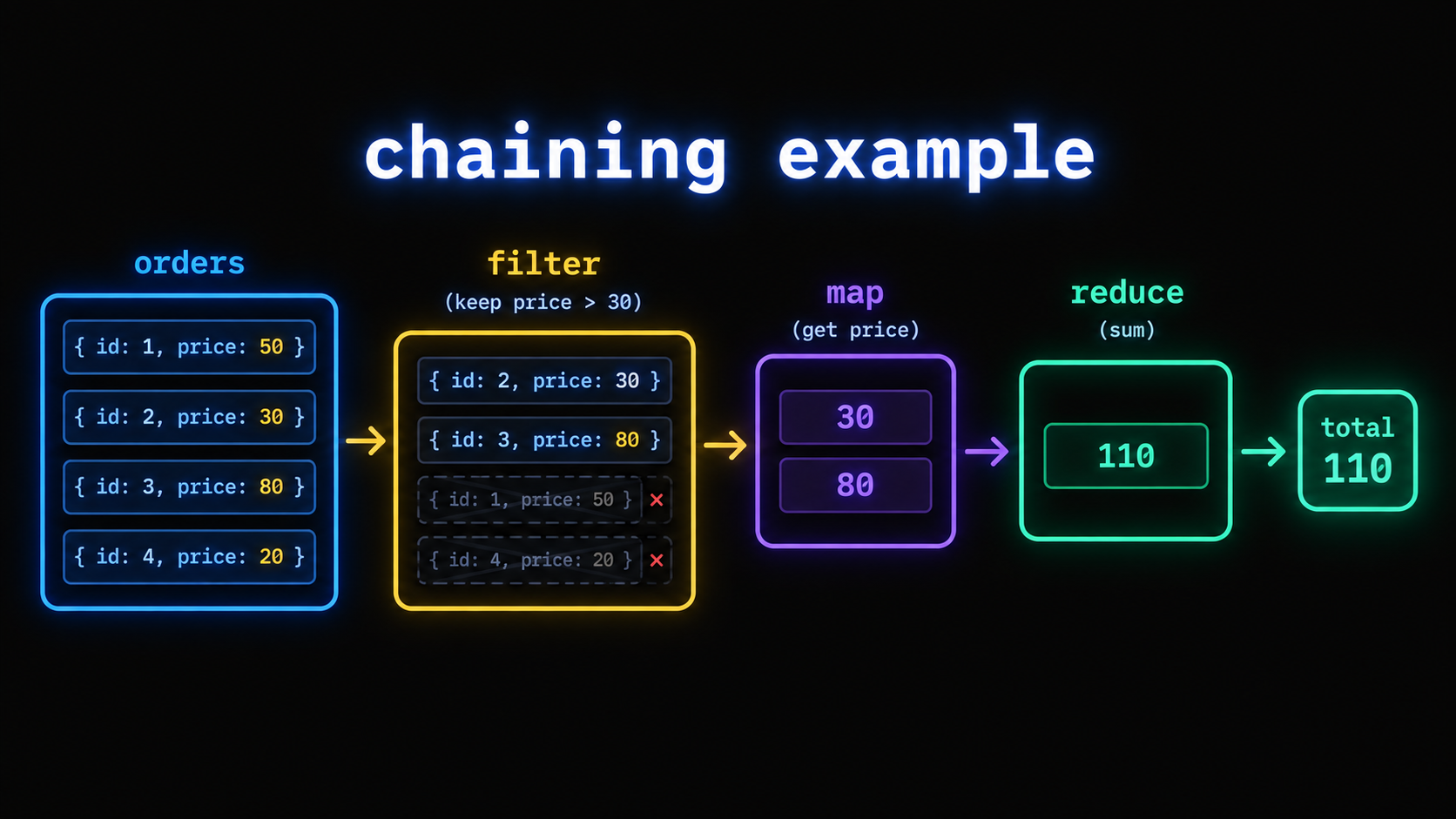
These methods often get chained together, one after another, to do a bigger task in a few readable lines.
js
const orders = [
  { item: "Laptop", price: 55000, delivered: true },
  { item: "Mouse", price: 700, delivered: false },
  { item: "Keyboard", price: 1500, delivered: true },
  { item: "Monitor", price: 9000, delivered: false }
];

const deliveredTotal = orders
  .filter(function (order) {
    return order.delivered;
  })
  .map(function (order) {
    return order.price;
  })
  .reduce(function (total, price) {
    return total + price;
  }, 0);

console.log(deliveredTotal); // 56500
Read this the same way you'd read the sentence in plain English: first filter out only the delivered orders, then map each one down to just its price, then reduce all those prices into a single total. Each method does one clear job, and chaining them together avoids writing one long, harder-to-read loop that tries to do everything at once.
Common mistakes beginners make
The most common mistake is forgetting that map and filter always return a brand new array, without changing the original one. If you forget to save the result into a variable, like writing numbers.map(...) on its own line without storing it, the new array is created and then immediately thrown away, which looks like the method "didn't work."
The second common mistake is forgetting the starting value in reduce, the second argument after the function. Without it, reduce uses the first item in the array as the starting accumulator instead, which can quietly produce wrong results, especially when you're building an object or a count instead of just adding numbers.
The third common mistake is reaching for reduce when map or filter alone would already do the job. If you're only changing each item, use map. If you're only picking out some items, use filter. Save reduce for when you actually need to combine everything into one final value.
Quick reference - which method to use
Method | What it does | What it returns |
|---|---|---|
| Changes every item in an array | A new array, same length as the original |
| Keeps only the items that pass a test | A new array, usually shorter than the original |
| Combines all items into a single value | One value - a number, string, object, or anything you build |
Wrapping up
map, filter, and reduce all do the same basic thing under the hood, which is go through an array one item at a time. The difference is only in what they do with each item. map changes it, filter decides whether to keep it, and reduce combines it into something bigger. Once you can picture that difference clearly, choosing the right one for the job becomes second nature.
If you want to see how these methods behave with async code, like fetching data for each item in an array, our
Async/Await guide is a good next read, since combining array methods with async functions has its own set of quirks. And if you're still getting comfortable with howvar, let, and const behave differently inside these callback functions, our Hoisting in JavaScript post covers that from the ground up.Related Articles
More insights you might enjoy

JavaScript Closures - The Concept Interviewers Actually Test
Closures are one of the most asked-about JavaScript concepts in interviews, and also one of the most misunderstood. This blog explains what a closure actually is, why functions can remember variables from outside their own scope, and where closures show up in real code

Higher-Order Functions in JavaScript
Higher-order functions are one of the most important ideas in JavaScript, and you're probably already using them without realizing it. This blog explains what makes a function "higher-order," why they matter, and how methods like map, filter, and setTimeout all rely on this same simple idea.

How the 'this' Keyword Works in JavaScript
The 'this' keyword confuses almost every JavaScript developer at some point because its value depends on how a function is called, not where it's written. This blog breaks down 'this' in every context - global scope, object methods, arrow functions, classes, and event handlers

JavaScript Hoisting Explained (With Simple Examples)
Hoisting is one of the first JavaScript concepts that confuses beginners, because it makes code behave in ways that don't match how it looks. This blog breaks down what hoisting actually is, how var, let, and const behave differently, and why you sometimes get "undefined" instead of an error

50+ Basic Linux Commands Every Developer Should Know
You don't need to memorize a man page to be productive in the terminal. This blog walks through the commands you'll actually reach for every day, then builds out into a full reference covering processes, networking, permissions, and more, all with real examples you can run yourself.

HTTP vs HTTPS: How HTTPS Actually Keeps Your Data Safe
HTTP and HTTPS look almost identical, just one letter apart, but the difference between them matters a lot - for security, for user trust, and even for SEO. This blog explains what each one actually does, how HTTPS keeps your data safe using encryption, and what happens behind the scenes
Comments
Sign in to join the conversation